How to Sign Up for Binance and Verify Your Identity, Step by Step
From typing in your phone number to passing the face check, the whole account-opening path broken into a few steps you can follow by tapping along. Where people get stuck, and which switch you have to turn on, are marked.
Opening a Binance account takes three steps: register with a phone number or email, set a password and turn on two-factor authentication, then verify your identity. The first two go quickly; what trips most people is the face check inside verification. Copy down the 2FA backup key the same day you set it up.
What You Need to Open a Binance Account
Spend two minutes gathering the basics first, and you save yourself the back-and-forth:
- An email or phone number you use. For signing up and receiving codes. Pick the one you actually check every day.
- Your own ID document. A passport or national ID. Wipe the camera first, and make sure the photo is sharp, all four corners are visible, and there is no glare.
- A quiet, well-lit spot. The last step of verification is a face check, and dim or backlit conditions make it fail.
- A payment method in your own name. You will need it to pay and receive when buying via P2P later. Always use an account verified in your own name, never someone else's.
Settle two things ahead of time too: whether to register by phone number or email (either works), and a strong password used only for this account, not the same one you use on other sites.
Step One: Register the Account
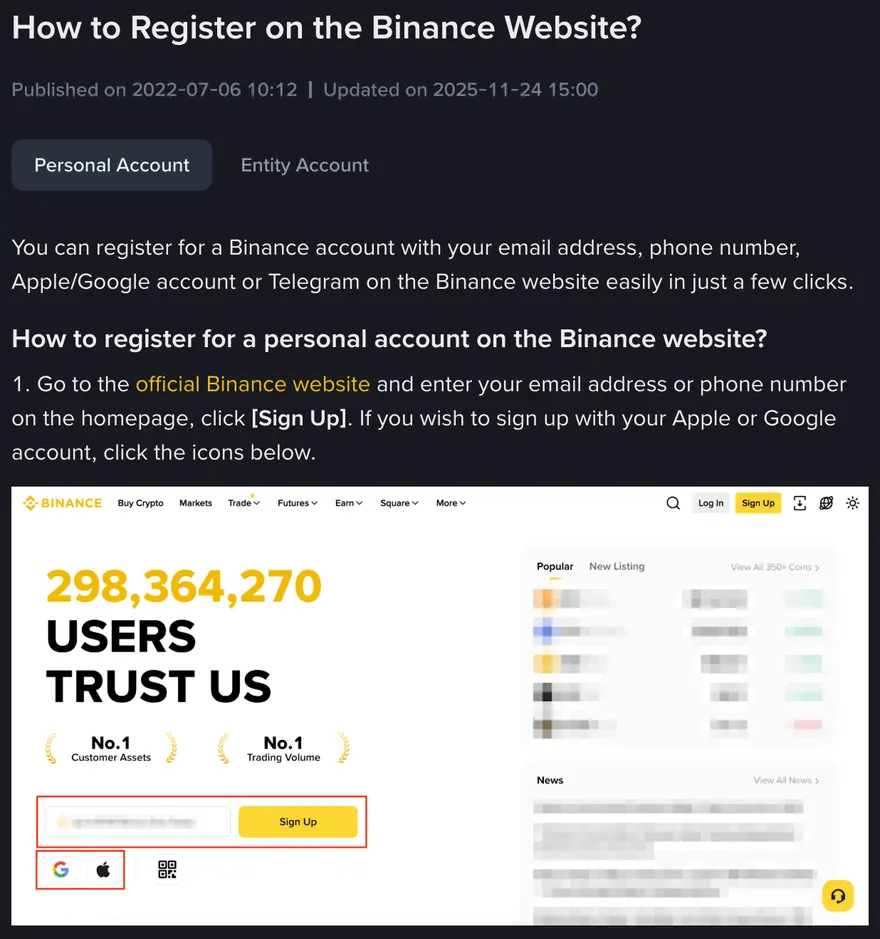
Download the Binance app from the official channel and tap [Sign up], or open the official site, enter your email or phone number on the homepage and click [Sign Up]. The flow runs roughly like this:
- Pick how you register. Enter a phone number or email; either one works.
- Enter the referral code. The page usually has a Referral / Invitation Code field. This site's public code is BNB2569; eligibility and the size of any benefit depend on the platform's current promotion. The field is normally completed during sign-up. If you enter through the official Binance registration page, enter the code manually and confirm it reads BNB2569.
- Get the code and verify. Enter the SMS or email code you receive to bind your phone or email.
Step Two: Set a Password, Turn On 2FA
This step decides the first layer of your account's security. Two things, and you cannot skip either.
Set a strong password. At least 12 characters, mixing upper and lower case, numbers, and symbols, and used only for this account. A lot of stolen crypto accounts trace back to a password that leaked somewhere else and got reused. If you cannot remember it, use a password manager; do not take the easy route with a birthday or phone number.
Turn on two-factor (2FA) right away. This is the linchpin of account security, so do it on day one. Binance supports a few methods:
- An authenticator app (recommended). Use something like Google Authenticator or Authy to generate rolling codes. It does not depend on SMS, so it is more secure and not vulnerable to a SIM-swap on your phone number. When you bind it, the screen shows a backup key; write it down on paper and keep it offline, because that is how you recover if you lose or change phones.
- SMS verification. It works, but it is less secure than an authenticator app. Use the app when you can.
Once 2FA is on, logging in, withdrawing, and changing security settings will each ask for a rolling code. A touch more friction, but this one step blocks the vast majority of account takeovers. The full setup for 2FA, an anti-phishing code, and a withdrawal allowlist is laid out item by item in Locking Down Your Account, worth following right after you open the account.
Step Three: Identity Verification (KYC)
Identity verification (KYC) is the platform confirming you are who you say you are, a hard requirement from regulators in most places, and every legitimate exchange does it. A platform that does not even ask you to verify is one to be wary of. In Binance you usually start under Identity Verification, with roughly these steps:
- Pick the document type and fill in your basics. Name, ID number, country or region, and so on. Your info has to match the document exactly, not one character off, because fixing a mistake is a hassle.
- Upload your ID photos. Photograph the front and back of your ID, or your passport, as prompted. Keep all four corners visible, sharp, glare-free, and uncropped.
- Face check (liveness). Blink, turn your head, or read out digits at the camera as prompted. Get the light right, face the lens straight on, and skip the mask and hat. With a window behind you, the check tends to fail for poor light; move to a front-lit spot and redo it.
Submit and wait for review; Binance's Help Center says submitted documents are usually reviewed within 48 hours, and particular cases can take longer. There is one hard rule beginners most often miss: the person doing the face check and the bank account used to pay later have to be the same person. Using a family member's account can easily trip risk controls and freeze your order. Use your own document and your own payment method from the start, and you save yourself a pile of trouble.
Set Up Anti-Phishing and a Withdrawal Allowlist
The account works now, but do not rush off to buy coins. Spend a few minutes laying the security groundwork, in this order:
- Confirm 2FA is on. If you skipped it at sign-up, add it now, preferring an authenticator app.
- Set an anti-phishing code. In the security settings there is an Anti-Phishing Code, a string of characters you choose. Once set, every official email Binance sends you carries that code; an official-looking email without it is basically fake. This lets you spot phishing emails at a glance, and we strongly suggest setting it.
- Know about the withdrawal allowlist. With it on, you can only withdraw to addresses you added in advance. It is a practical safety net for a beginner; you can set it when you are ready to withdraw, but it is worth knowing it exists.
- Run the whole flow with a small amount. Use a few dollars up to ten or twenty and walk the chain end to end: swap local currency into USDT, place a spot order, see the coin land. Check first whether P2P is available where you live.
Every step of a first buy, how to swap local currency for USDT via P2P, how to choose between a market and a limit order, which numbers to read before you commit, is broken down in Buying Your First Coin, so you can move straight into it after opening the account. If the whole beginner path has not clicked together yet, look back at Crypto for Complete Beginners to see where opening an account fits in the flow.
A Few Spots Beginners Get Stuck
Here are the high-frequency snags, so you do not panic when you hit one:
- The code does not arrive. On a phone, check signal and any blocking app; on email, dig through the spam folder. Most of the time it was filtered, not unsent.
- You filled in your KYC info wrong. A wrong name or ID number causes a failed check or later limits. Check it against your document character by character before submitting.
- The face check keeps failing. Usually it's the light. Avoid backlight, find a front-lit spot, remove anything covering your face, and do it slowly facing the lens.
- You did not enter the referral code. Whether it can be added later, and whether any benefit applies, depends on the platform's current rules. If you want to use this site's public code, confirm BNB2569 during sign-up.
- You forgot to back up 2FA. If you did not copy the authenticator backup key, recovering after a lost or changed phone gets painful. Always keep one copy offline.
Want to try it yourself?
If you want to try it, start small: go through sign-up and a first USDT purchase with a modest amount.
This article contains a Binance referral link. If you sign up and trade through our link, we may earn a commission from Binance, and any benefit for you depends on the platform's current promotion. That is how this site pays for itself, and it does not change what we write. We are an independent third-party information site, not the official Binance website. Rates and processes follow whatever the exchange page shows in real time. Crypto prices swing hard and you can lose your entire stake. This is for education only and is not financial advice.